

[SL] VPN is an enterprise solution for secure remote access, built on the principles of Zero Trust Network Access (ZTNA). It supports Windows, Linux, macOS, iOS and Android, providing secure VPN connections, multi-factor authentication, advanced auditing and metrics, flexible security policies, and cryptographic protection in accordance with the requirements of the Republic of Belarus
Cross-Platform VPN Client
A single client is available for Windows, Linux, macOS, iOS, iPadOS, Android and tvOS. The solution uses native platform capabilities, including Face ID, Touch ID and Windows Hello, providing a consistent and secure user experience across devices
Zero Trust for Every Connection
Every request undergoes mandatory verification of the user, device and applicable security policies. The solution supports multi-factor authentication, device verification, geographic restrictions and compliance checks against organizational requirements, reducing the risk of unauthorized access
Centralized Access Control
The platform combines all the tools required to organize secure remote access: client VPN, Site-to-Site VPN, Firewall compliant with STB 34.101.73-2017, geoblocking, access schedules and security policy management. Administrators can configure access rights, monitor connections and track security events through a single interface
Unique advantages of
01
Compliance with the Requirements of the Republic of Belarus. VPN supports cryptographic algorithms and TLS cipher suites specified in STB 34.101.65-2014. The solution is suitable for organizations that need to use certified information security mechanisms and comply with local information security requirements
02
Secure Remote Access. The solution supports client VPN connections and Site-to-Site connections. Authentication can be performed using certificates, PSK and additional identity verification mechanisms, providing secure access to corporate infrastructure
03
Flexible Security Policies. Each connection can be subject to access rules, geographic restrictions, device requirements, schedules, Firewall and Proxy policies. This allows security settings to be adapted to the specific infrastructure and different user categories
04
Modern Authentication. The solution supports certificates from third-party certification authorities, including GosSUOK, as well as multi-factor authentication using OTP (email, SMS) and TOTP (Indeed MFA, RFC 6238). Face ID, Touch ID, BiometricPrompt (Android) and Windows Hello are available for fast and secure application access. The solution supports user-to-device binding and the use of multiple authentication factors in accordance with the organization's security policy
05
Monitoring and Auditing. The system provides detailed information about connections, user activity and security events. Available features include action auditing, change history, connection visualization on a map, and integration with external Syslog collectors for centralized auditing
06
High Performance. The solution is designed with modern performance and scalability requirements in mind. Optimized network traffic processing, efficient handling of a large number of connections, and a responsive interface ensure convenient operation for both users and administrators
How it works
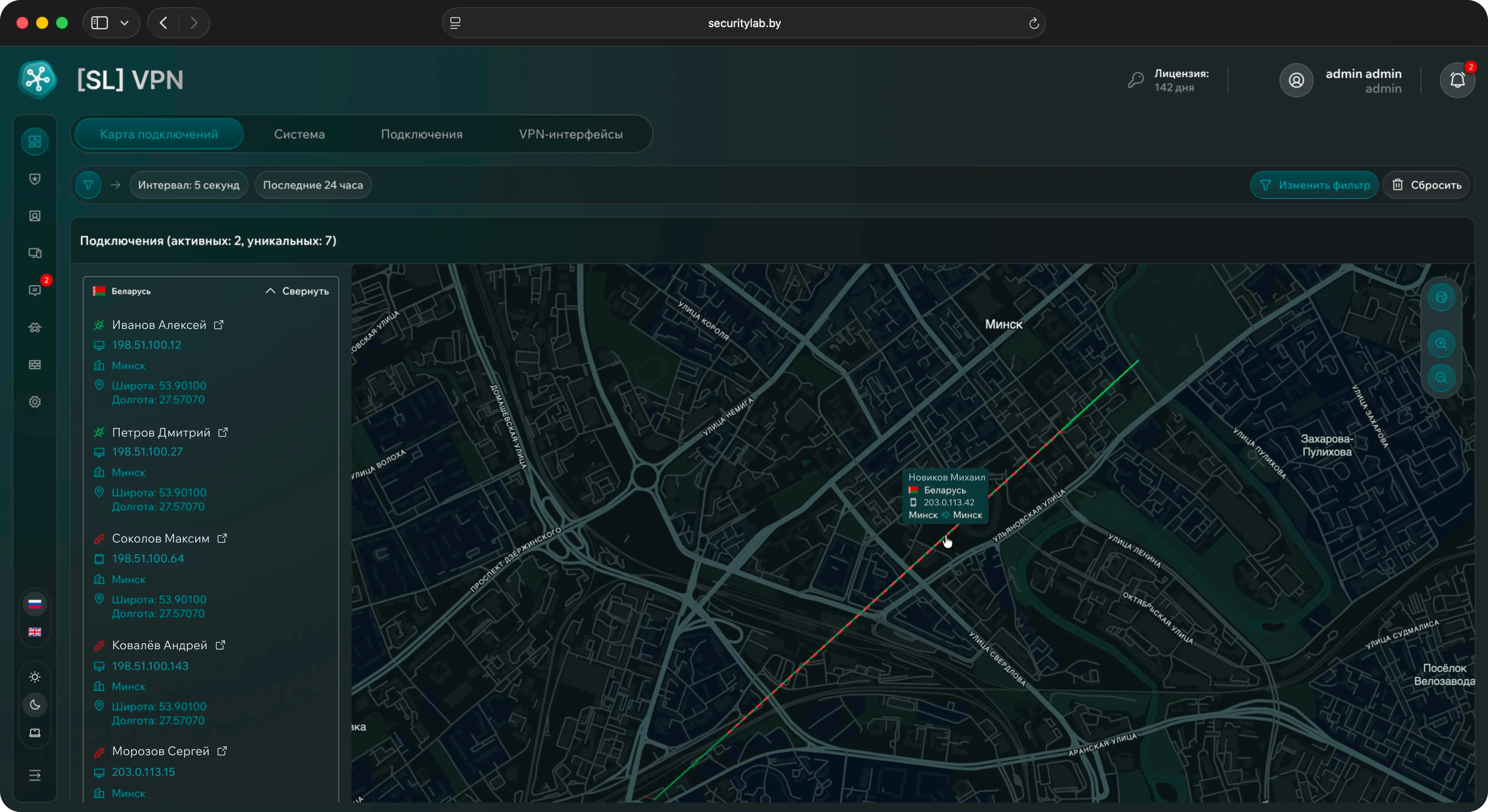
The Connection Map provides a visual representation of active VPN connections and their geography. The map displays active VPN connections and their geographical locations – connection source and destination points provide a clear view of network activity distribution. Information about connected users includes their first and last name, client IP address and geographic coordinates. When hovering over a marker, detailed connection information is displayed, including country, device type, and connection source and destination points. Activity can be analyzed using a filter for the selected time period. The filter is applied to all tabs in the Home section, providing a consistent time context when working with the data
Submit a request for DEMO access
Request DEMO access to test the solution, explore the interface, and see how effectively it fits Your infrastructure